
Every data-centric SaaS company is now under the same pressure: add AI to the product in a way that feels useful, credible, and close to the core workflow. The default starting point is usually a chatbot. It is easy to prototype, easy to explain, and easy to ship as a sidebar.
The problem is that most analytical products were not built around text. Their users work through tables, charts, filters, scorecards, and approval steps. They compare categories, review plans, inspect edge cases, and move back and forth between summary and detail. A text answer can be helpful, but on its own it often breaks the product experience rather than extending it.
A paragraph or a raw markdown table is rarely the best possible response. In a production product, the better response may be a plan that can be reviewed, a chart that makes the ranking obvious, and a table that preserves exact values. The real question is not whether your product needs AI. It is whether your AI can speak the visual language of your product.
What Generative UI actually means
Generative UI is often described too loosely. In this context, it does not mean asking a model to invent an entire frontend from scratch. It means giving the agent a bounded set of production-ready UI components and letting it select the right one for the job, populate it with structured data, and render it inside the existing application.
That distinction matters. A reliable product surface needs guardrails. The UI elements need predictable behavior, known states, and data contracts that the rest of the application can trust. When an agent is working with validated components instead of free-form markup, the output becomes much easier to reason about, test, and integrate into the host product.
Flow Gen UI is an opinionated implementation of that idea. It focuses on schema-defined components, lightweight streaming, and large-result handling through references rather than by forcing every row of data through the model response.
What Flow Gen UI adds
Generative UI needs to stay reliable enough for a production product. If the model is free to invent components, props, and interaction patterns on the fly, the output quickly becomes hard to validate and even harder to trust. Flow Gen UI addresses that with a bounded component registry. The agent selects from predefined components such as Table, BarChart, and LineChart, each backed by a validated schema.
Even when the underlying data is correct, a text-only agent still has to decide how to present it, and free-form generation often defaults back to prose. Flow Gen UI addresses that with structured selection rather than improvisation. A plan review can become an approval card. A long result set can become a table. A categorical comparison can become a bar chart. The model is still making decisions, but it does so inside a constrained response vocabulary.
Every product has its own domain objects and workflows. A fixed catalog is useful, but it is rarely enough on its own. Flow Gen UI is extensible, so teams can define custom component schemas, specify the accepted prop types, implement the UI elements that render them, and add those components to the registry.
Furthermore, large datasets create a different kind of challenge. Once a result contains hundreds of rows, embedding the full payload directly in the agent response becomes inefficient and fragile. Data can pollute the stream, the underlying LLM may ignore and truncate large data objects, or the increased latency may cause timeout errors. DataRef addresses that by letting the response carry a lightweight reference instead of the full dataset. The host application then resolves that reference through a data callback, which becomes the fetch boundary between UI structure and underlying data. That keeps the stream focused on interface definition rather than turning it into a transport layer for every row.
{
  "component": "Table",
  "props": {
    "dataRef": {
      "id": "lindt-products",
      "endpoint": "/api/visualization-data",
      "totalRows": 193,
      "pageSize": 25
    },
    "columns": ["product_name", "brand_tier", "flavor_category"]
  }
}
Responsiveness is the other half of the experience. If users have to wait for the entire response before anything renders, the interaction feels like delayed text rather than product-native UI. Flow Gen UI addresses that with lightweight streaming. Under the hood, a flat UI tree can be updated through small stream operations such as init, add, update, append_child, and done. That keeps the response compact and makes it possible to show structure first, then fill in the finished interface as the system resolves the rest of the work, progressively rendering output as it is made available.
const uiTree = {
  root: "root",
  elements: {
    root: {
      key: "root",
      type: "Stack",
      props: {},
      children: ["plan", "results"],
    },
    plan: {
      key: "plan",
      type: "CommandCard",
      props: {
        title: "Query plan",
        actions: [{ id: "proceed", label: "Proceed" }],
      },
    },
    results: {
      key: "results",
      type: "Table",
      props: { dataRef: { id: "revenue-q1", totalRows: 4, pageSize: 25 } },
    },
  },
};
This matters most when the response has to move from query to execution using an interface the user can actually work with.
From query to interface: how the architecture works
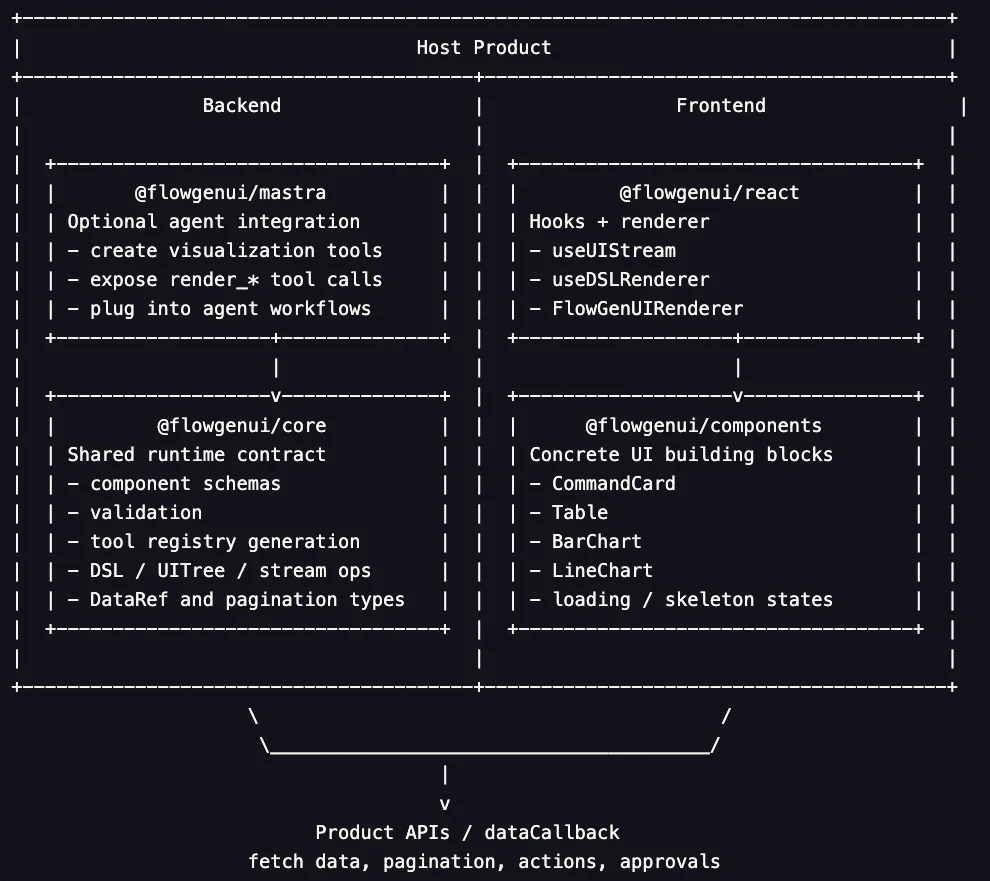
The architecture is designed around a clean separation of concerns. One layer defines the UI contract through validated schemas and structured component choices. Another handles the transformation of that structured output into a lightweight stream that can be rendered progressively. A separate rendering layer turns that stream into product-native interface elements such as charts and tables while the host application remains responsible for data access, pagination, and user actions. That separation is what makes the system reliable enough for production and flexible enough to fit inside an existing product.
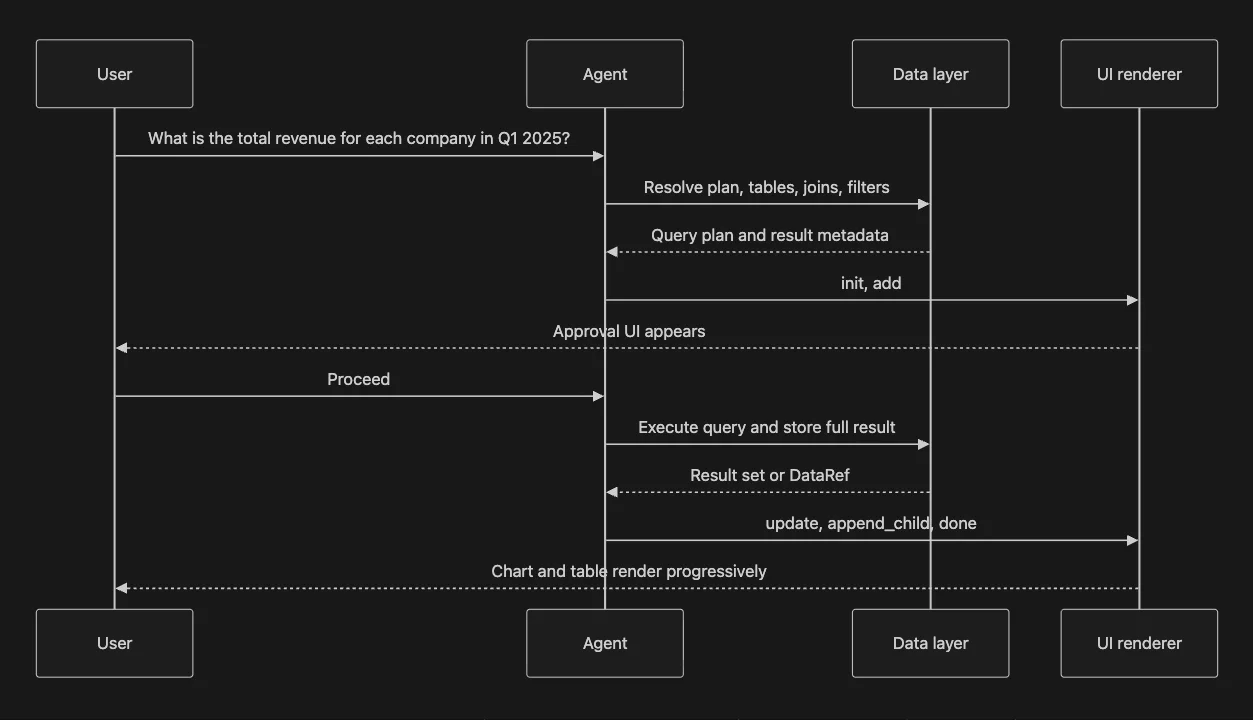
Take a simple analytical question:
What is the total revenue for each company in Q1 2025?
A useful answer is not just a number or a block of SQL. It is a small interaction flow that moves from intent, to review, to execution, to inspection.
1. Plan the task
The first step is interpretation. The system needs to understand what "total revenue" means in the context of the product's data model, which tables are relevant, how they join, which filters apply to Q1 2025, and which output columns the user actually needs. That planning step is often invisible in a chat response, but in production it is one of the most important parts of the interaction because it determines whether the user trusts what happens next.
2. Render the approval step
Once the plan exists, a plain text explanation is usually not enough. The user should be able to review scope, joins, filters etc in a structured format. This is where an approval card is useful. The plan becomes an approval surface with a clear title, grouped metadata, a collapsible SQL preview, and an explicit action such as "proceed." Instead of parsing prose, the user is reviewing concrete UI inside the product.
3. Execute and resolve data
After approval, the backend can execute the query and retrieve the full result set. This is also where data handling becomes important. If the result is small, the response can carry inline data. If the result is large, the full payload can stay outside the model response and be referenced through DataRef. That preserves completeness without turning the agent response into a transport mechanism for every row.
4. Choose the right response shape
The best response format depends on the analytical job. For Q1 2025 revenue, a composed answer is more useful than plain text: a bar chart helps the user compare magnitude quickly, while a table preserves exact values. For a product catalog question, the right answer may be a paginated table rather than a chart. The important point is that the system can choose from product-native response shapes instead of forcing every answer into a paragraph.
5. Stream into the host product
The final step is delivery. The UI appears progressively inside the host application, starting with the initial structure and resolving into the finished interaction. The user does not have to wait for the entire response to materialize before seeing anything. They can see that a plan is being prepared, that a review surface is available, and that the analytical view is taking shape in the same visual language as the rest of the product.
Three places text breaks down
The difference becomes easiest to see when the same class of question is answered in two different ways: once as text, and once as a structured interface inside the product.
1. Large data fetching and display
What chocolate products does Lindt sell?
This looks like a simple retrieval question, but it quickly becomes a UI problem once the result is large enough to matter.
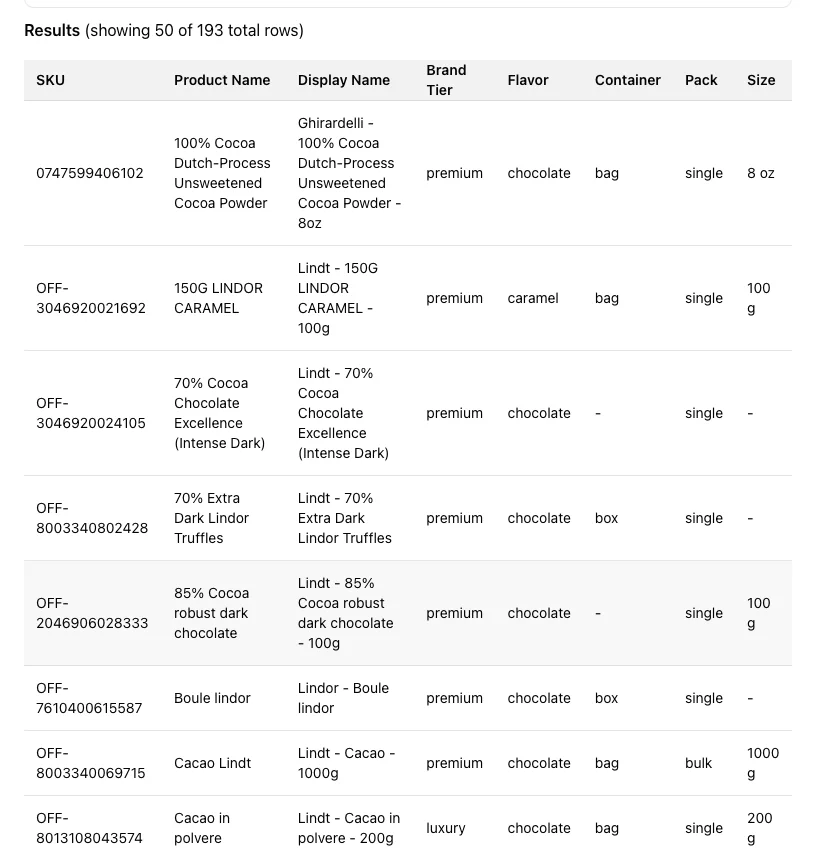
Text or an inline table exposes only part of a long result (50 of 193 results) and gives the user no product-native way to page through the full catalog. Even if the model returns a few representative rows, the response is incomplete as an exploration surface.
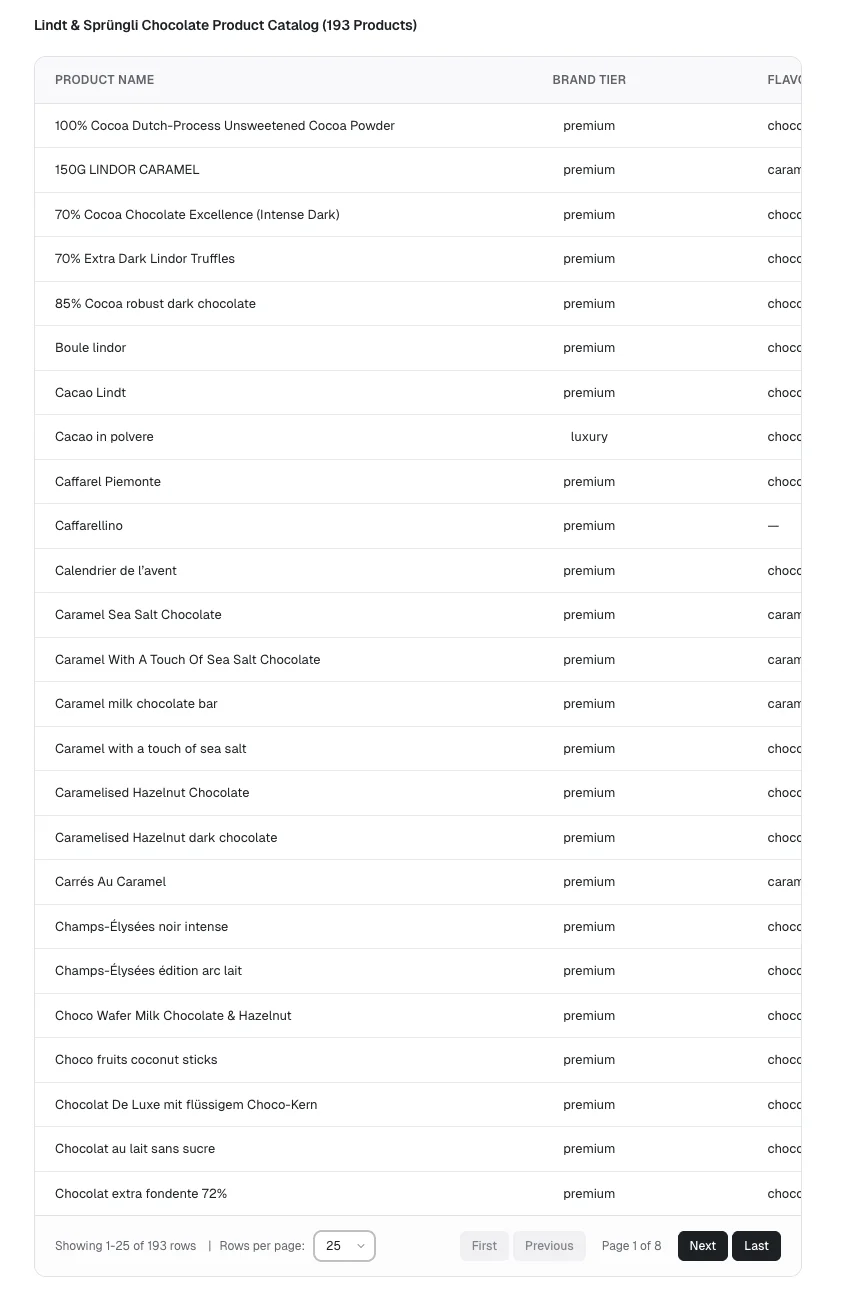
With Flow Gen UI, the response becomes a paginated, scrollable and dynamic table backed by DataRef, so the UI can show all 193 products without forcing every row through the model response.
2. Structured information
What is the total revenue for each company in Q1 2025?
The agent application may create a plan to answer this user query, and display the results for approval.
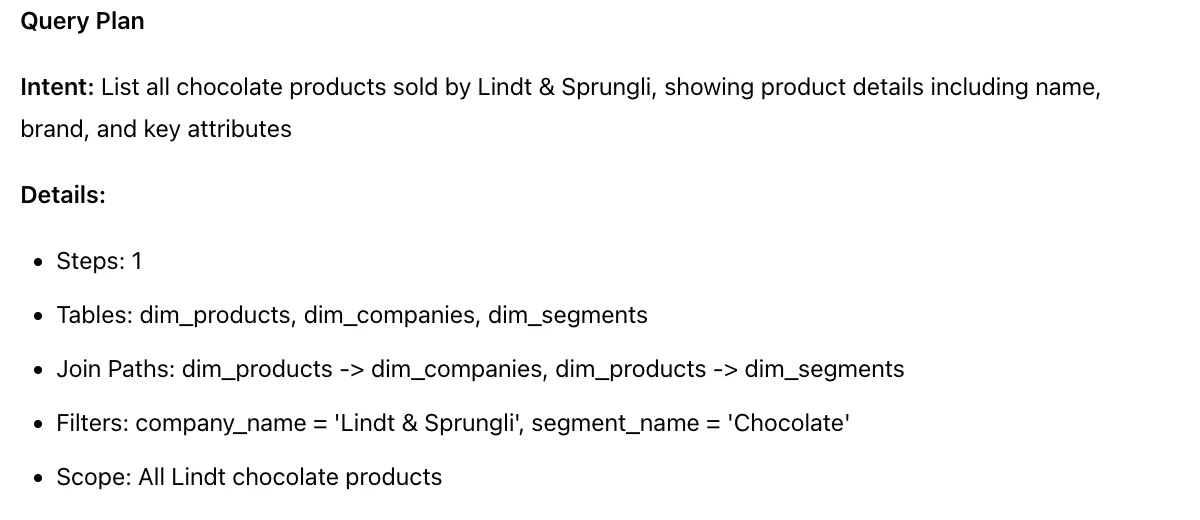
The textual plan may be technically correct, but the user has to parse raw text, infer the scope, and decide what to do next from prose. That creates unnecessary friction and accounts for a bad UX.
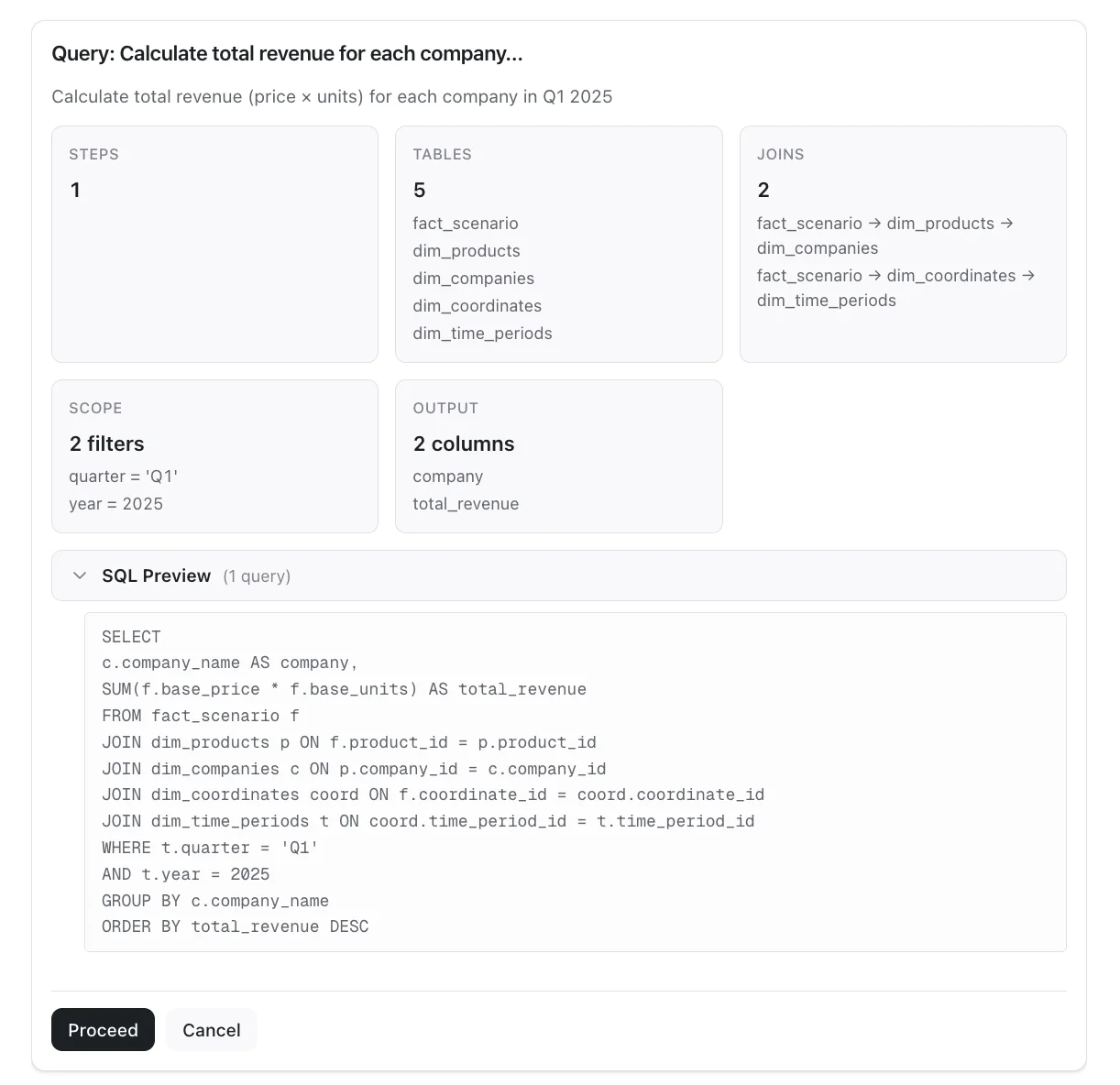
With Flow Gen UI, the same plan becomes a structured approval card with dynamic and context specific content: clear scope, joins, output columns, a collapsible SQL preview, and an explicit proceed action. The UI is composable, extensible, and native to the agent output.
3. Analytical reasoning and relevant UI
What is the total revenue for each company in Q1 2025?
Even when the result set is small, the response layer still matters because users need both speed and interpretability.
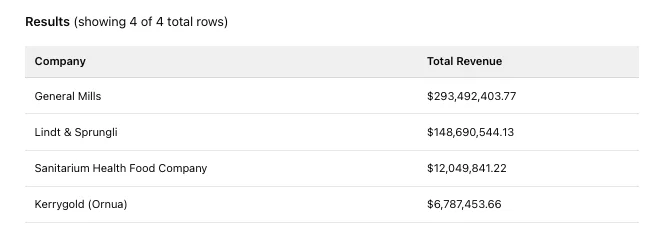
A markdown table can contain the answer, but it does not help the user compare magnitude or scan the result quickly. The user still has to do the visual work themselves.
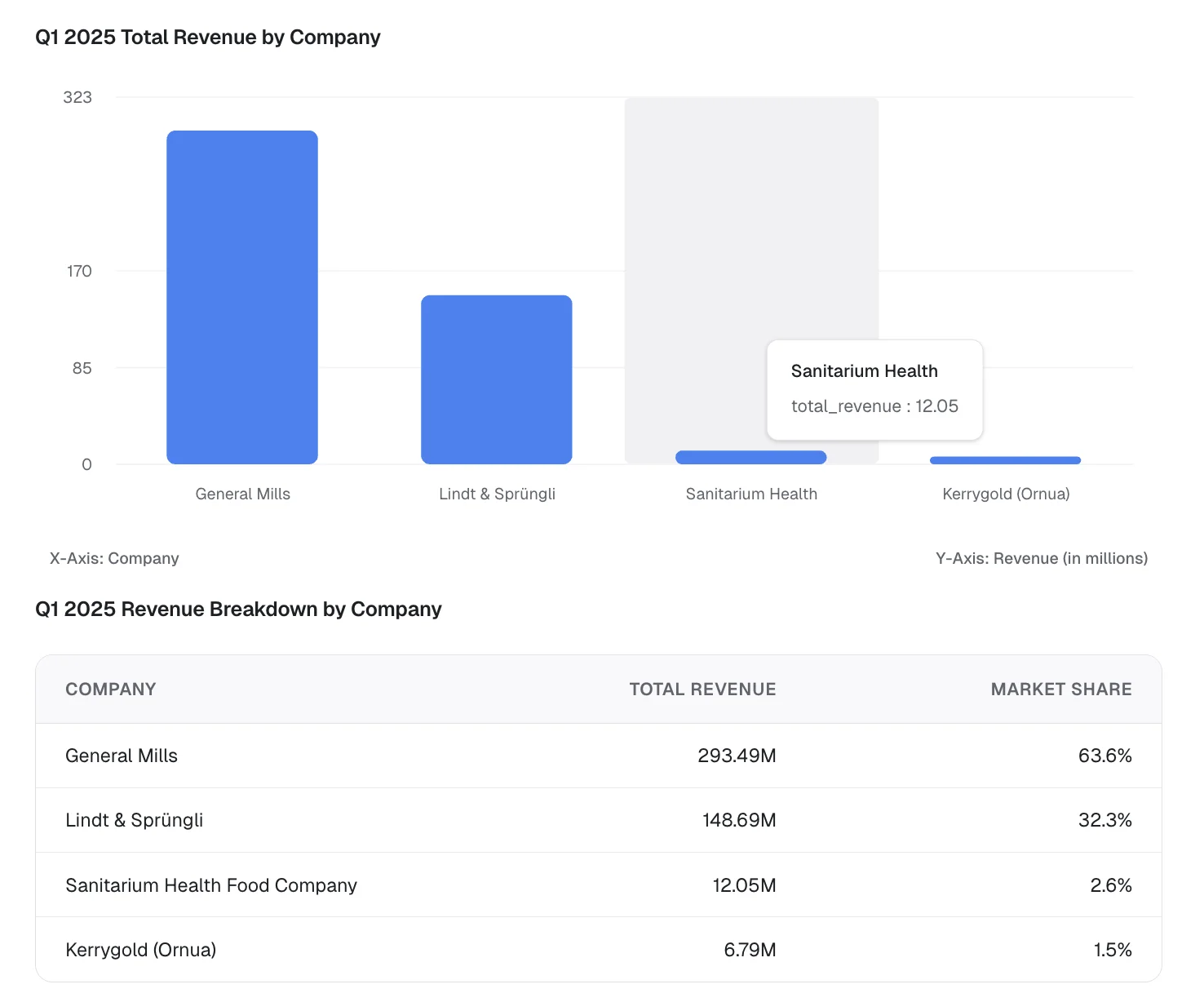
With Flow Gen UI, the data is understood and reasoned with appropriate visualization recommendations. The result becomes a bar chart and a table, so users can see both ranking and exact values in the same response.
Engineering realities of generative UI
What makes generative UI compelling is also what makes it technically demanding. Once the response has to be reliable, fast, and compatible with the rest of the product, the challenge stops being prompt design alone. It becomes an engineering problem shaped by data volume, validation, streaming behavior, and application boundaries. A few challenges that we have tackled, include:
- Data scale: real SaaS result sets are often too large to push through the model without distortion, truncation, or unnecessary latency. A response layer that relies on inline payloads alone will eventually fail on exactly the kinds of exploratory questions users care about most.
- Reliability: arbitrary UI generation is too brittle for a production product surface. If the system can only render from a validated component registry, the output becomes much more predictable. The agent is still flexible, but the interface stays inside tested boundaries.
- Streaming UX: users need immediate structural feedback while the response is still being assembled. If the interface only appears once every part of the answer is complete, the product feels slower and less trustworthy. Lightweight streaming lets the response start behaving like UI earlier in the interaction.
- Deployment constraints: many teams need the host application to stay in control of data access, execution boundaries, and model choices. That means the UI layer has to work with host-controlled fetch paths and application logic, rather than assuming that all reasoning, execution, and rendering live inside a single hosted black box.
Where Flow Gen UI fits
There are already useful building blocks in this category. json-render, for example, is a strong reference point for a general-purpose, schema-driven generative UI framework. It uses a flat spec, focuses on structured rendering, and is designed to work across multiple renderers. That makes it valuable if you are solving a broad UI generation problem across different surfaces.
For data-intensive applications, the center of gravity shifts. The challenge is not only rendering structured UI, but also handling large result sets without pushing everything through the model, supporting optimized streaming and mitigating data pollution. A general-purpose framework can support those patterns, but teams still need to define the domain-specific components, data access boundaries, and orchestration that make them work well inside an analytical product.
Flow Gen UI is narrower and more opinionated. It is optimized for data-centric SaaS workflows where the response may need to move through approval, execution, and inspection inside an existing analytical product. In that context, paginated tables and large-result handling through DataRef matter as much as the rendering model itself.
The same applies to SDKs and component libraries more broadly. They are useful for transport, rendering primitives, and integration patterns, but they do not by themselves solve response orchestration, schema selection, or large-data indirection inside the product. Those are the parts that determine whether the agent output feels like a real feature or just a formatted message.
Closing thoughts
For teams building AI features into a data product, the response layer is often the difference between a demo and a production feature. If the agent can only talk in text, it will eventually run into the limits of text. If it can render review steps, charts, and tables inside the product, the experience becomes much closer to how users already work.