
If you already have robust evals for your agent, you're closer than you think to a self-improving system.
I spend a lot of time debugging and improving agents. My development loop usually looks like this: run evals, inspect failures, tweak the prompt, re-run, watch pass@k, check regressions, repeat. I keep going until the agent hits the customer's target thresholds.
And it works. With strong evals and good test coverage, this process is incredibly powerful. But it's still manual.
When I have to edit system prompts, I still rely on intuition. Even with a clean layered structure and well-organized rules, I still wonder: is this really redundant? Should this instruction move? Can I remove this example without hurting reliability?
At the same time, I already had something much more objective sitting in my repo: a robust eval suite with structured failure reasons and measurable metrics.
So I decided to turn prompt engineering into a measured optimization problem.
I built a Claude Code SKILL that runs our eval suite, identifies failures, proposes minimal edits to the system prompt guided by my instructions, validates them on targeted spot checks, and either keeps or reverts the change.
It's the same loop I would run myself. It just runs faster, more systematically, and without fatigue.
Below I'll show how it works and how you can build something similar if you're building agents.
Background
I've been building AI agents for market simulation for one of our customers. The planner agent takes natural-language requests like "increase prices of all [BRAND] products by 10%" and translates them into structured, executable plans.
This agent runs against real enterprise data and feeds directly into downstream systems. If it produces the wrong plan shape, it creates a cascade of errors.
The system prompt behind this agent is 550+ lines long. It encodes operational rules, tool usage constraints, domain knowledge, formatting requirements, and carefully designed examples. It follows a layered structure so it's maintainable and expandable as the agent evolves.
To be honest, it's a good prompt.
At the time of the experiment, it was sitting at ~99% pass@1 across 21 test cases.
But I still wanted to see whether Claude could compress and simplify an already high-performing prompt without compromising reliability.
You need strong foundations
The experiment I had in mind would only work if the evals are strong enough to act as hard quality gates. In my case, I already had three critical pieces in place:
- An eval runner that produces structured, machine-readable results with test case IDs, pass/fail per attempt, and most importantly, a reason that's specific enough to act on.
- A test suite with meaningful coverage, with test cases that contain expected trajectories and outputs.
- A Claude Code subscription.
With these in place, I leveraged Claude Code's skills system to package this into a repeatable workflow.
The loop is intuitive for any AI engineer who has built agents:
Run baseline eval → Diagnose failures → Edit prompt → Run targeted eval → Keep or revert → Repeat
That's it. The same loop I would run manually. The difference is that the machine doesn't get tired after iteration three, and it can explore the space much faster than I can.
The SKILL
I made a template available in this repository so you can adapt it to your own evaluation workflows.
Conceptually, the SKILL is just a set of files including instructions and scripts that define the loop.
To build it, I spawned Claude Code inside the repository where the planner prompt and eval runner live. I gave it Anthropic's Skills documentation and explained the optimization workflow I wanted to formalize.
After a bit of back and forth with Claude, the SKILL was fully functional.
It lives in:
.claude/skills/optimize-prompt/
├── SKILL.md              # Defines the loop and constraints
├── methodology.md        # Encodes the optimization phases
└── scripts/              # Shell scripts enforce deterministic parsing and comparison
    ├── parse-eval.sh
    └── compare-evals.sh
And it can be invoked within Claude Code with this slash command:
/optimize-prompt [AGENT] [MAX-TURNS] [BASELINE] [INSTRUCTIONS]
For example:
/optimize-prompt planner 6
That means: optimize the planner prompt with a budget of 6 eval runs.
If I already have a recent baseline eval JSON, I can skip the baseline phase and save tokens:
/optimize-prompt planner 5 scenario-eval-planner-2026-02-26.json "shorten the system prompt operation rules section"
The instructions are quite important since they guide Claude Code towards the optimization goal.
Optimization phases
The phases mirror how I would run the process manually, but formalized into explicit stages with constraints.
Phase 0: Setup
Claude creates a dedicated git branch:
prompt-opt/<agent>-<timestamp>
It reads the current prompt, and loads the SKILL instructions and context so it has a consistent way to classify problems.
The taxonomy in the skill ensures that failure classification stays consistent across iterations. Edits should never be random and they must map to a concrete failure pattern or redundancy hypothesis.
Note I initially considered using git worktrees to parallelize multiple optimization attempts, but for this experiment I kept it simple.
Phase 1: Baseline (optional)
If no baseline JSON is provided, Claude establishes one using my eval runner:
npm run eval:planner -- --samples 5 --report-k 1,3,5
This defines the reference state.
If a recent baseline is passed explicitly, this phase is skipped to save tokens and budget. The optimization always compares against a fixed reference.
Phase 2: Diagnose
Claude parses the eval output using the deterministic scripts in the SKILL and groups failures by pattern. It's instructed to use the scorer reasons to stay grounded, and then it tries to map failure types to prompt sections.
Claude is limited by what it can observe in the results file.
Phase 3: Optimize
This is the constrained search loop: one hypothesis per iteration, make a minimal edit, run a cheap eval, keep or revert.
Cost control is built into the phase:
- Start with 3–5 test cases, 1 sample.
- Escalate only when evidence justifies it.
- Never jump to full-suite validation prematurely.
Phase 4: Validate
Once intermediate spot checks pass consistently, Claude runs a full-suite comparison against baseline. This is where subtle regressions can surface. Even if targeted tests pass, global reliability can degrade.
Phase 5: Commit (human-gated)
Claude presents the changes, the eval deltas and the summary of tradeoffs. Nothing gets committed unless I explicitly approve it.
A real optimization run
Here's what an actual session looked like.
Remember: the planner was already at ~99% pass@1 across 21 test cases. There were no obvious failures. My goal was to reduce redundancy and instruction length while maintaining reliability.
I ran:
/optimize-prompt planner 5 scenario-eval-planner-2026-02-26.json "shorten instructions and reduce redundancy"
Initialization
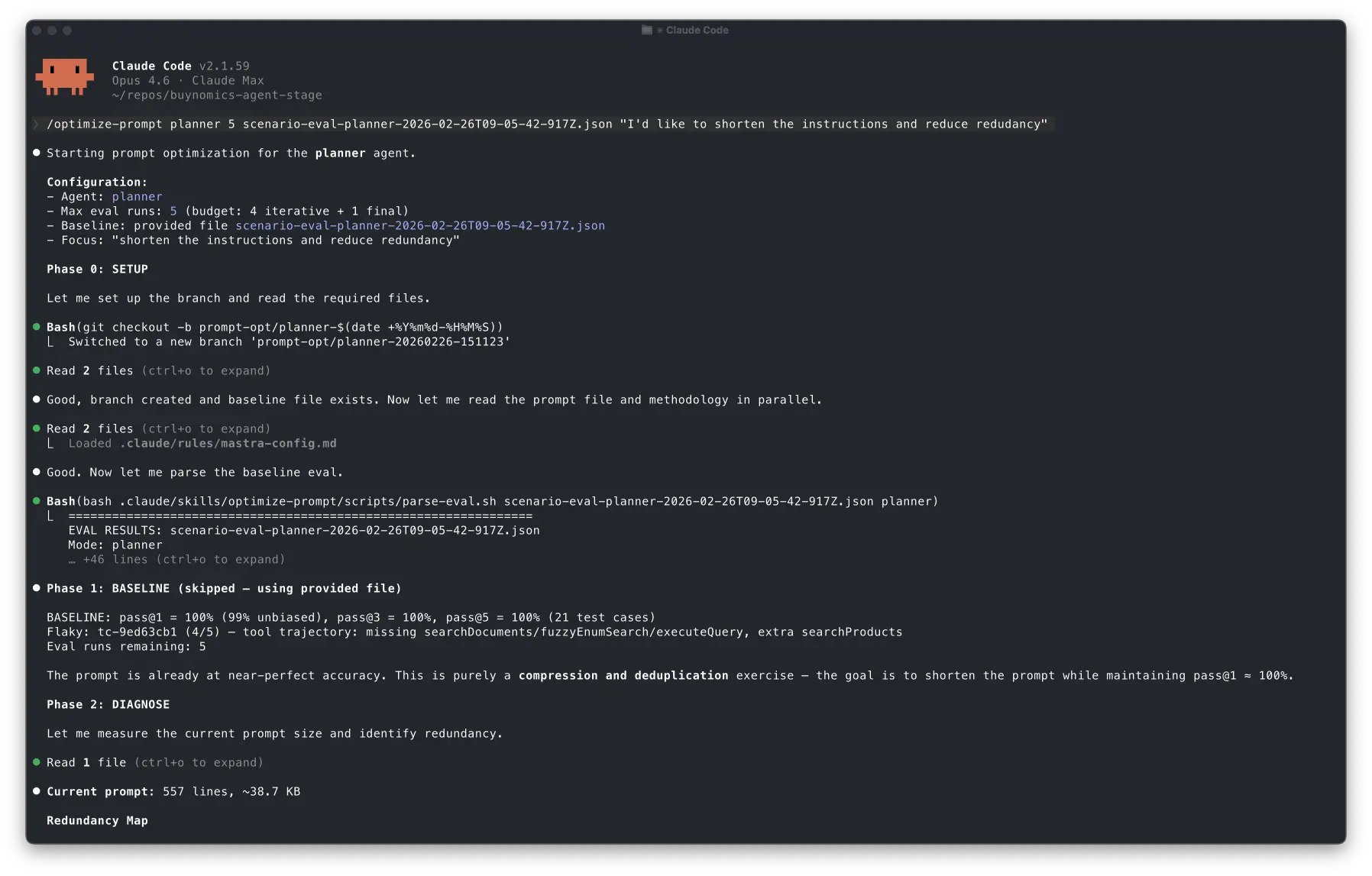
First, Claude loaded the SKILL and understood the configuration given in the command:
Starting prompt optimization for the planner agent.
Configuration:
- Agent: planner
- Max eval runs: 5 (budget: 4 iterative + 1 final)
- Baseline: provided file scenario-eval-planner-2026-02-26T09-05-42-917Z.json
- Focus: "shorten the instructions and reduce redundancy"
After that, it set up the prompt-opt/planner-20260226-151123 branch and skipped phase 1 since the eval JSON file was available:
Phase 1: BASELINE (skipped — using provided file)
The prompt is already at near-perfect accuracy. This is purely a compression and deduplication exercise — the goal is to shorten the prompt while maintaining pass@1 ≈ 100%.
You can see how it understood that the optimization target was size reduction under strict reliability preservation by reading the reasoning trace.
The diagnosis
Claude read the prompt and generated a redundancy map, highlighting repeated tool usage instructions, overlapping domain knowledge explanations and inline examples that duplicated canonical rules.
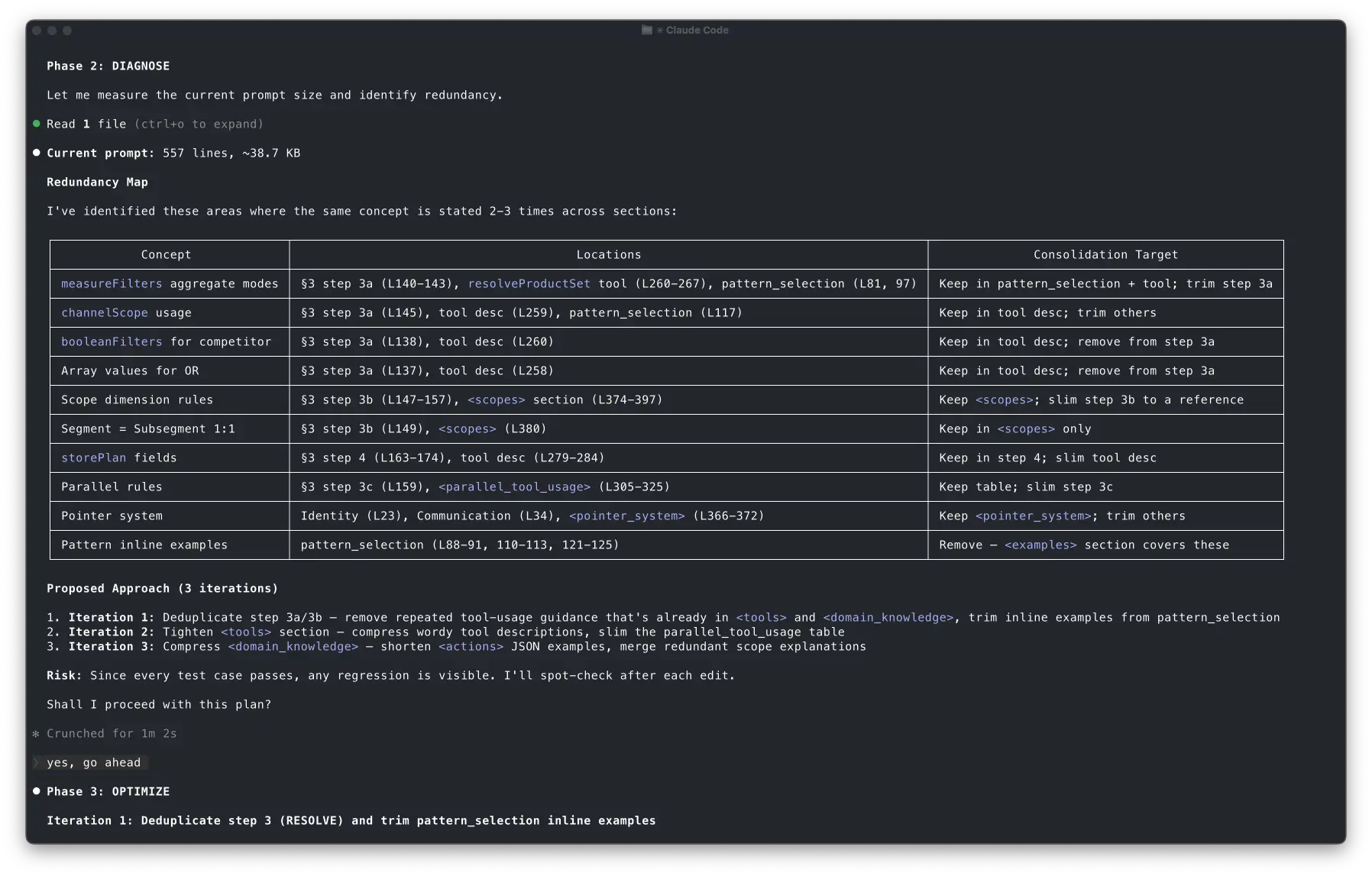
Claude proposed three targeted iterations to consolidate the instructions:
- Iteration 1: Deduplicate step 3a/3b — remove repeated tool-usage guidance that's already in <tools> and <domain_knowledge>, trim inline examples from pattern_selection
- Iteration 2: Tighten <tools> section — compress wordy tool descriptions, slim the parallel_tool_usage table
- Iteration 3: Compress <domain_knowledge> — shorten <actions> JSON examples, merge redundant scope explanations
Risk: Since every test case passes, any regression is visible. I'll spot-check after each edit.
Claude brought me in the loop after this step even though I hadn't instructed it to do it. But I'm okay with that to be honest. In any case, this behavior can be fixed by tuning the instructions in the SKILL.
Iteration 1: it went too far and reverted
The first attempt removed a chunk of instructions in one shot. It looked reasonable on a diff, but Claude ran a quick spot-check eval that surfaced a regression immediately. A test case that used to be rock-solid started producing the wrong plan shape.
What I liked most is that it didn't try to justify the regression or patch around it.
Iteration 1 (revised): surgical cuts only
The second attempt was more conservative. It removed only the things that were clearly duplicated like very similar examples, repeated prose that restated the same rule, and references that could safely point to a single canonical section.
This time the spot check passed, including the previously regressed test case.
Bash(npm run eval:planner -- --samples 1 --report-k 1 --filter tc-2826ac2e,tc-9ed63cb1,tc-122e5f10,tc-be4a8e59,tc-51cead35)
⎿ > postgres-air-data-agent@1.0.0 eval:planner > tsx src/scripts/run-scenario-eval.ts --mode planner --samples 1 --report-k 1 --filter tc-2826ac2e,tc-9ed63cb1,tc-122e5f10,tc-be4a8e59,tc-51cead35 … +86 lines (ctrl+o to expand)
⎿ (timeout 10m)
5/5 passed — all test cases including tc-2826ac2e (the previous regressor) and tc-9ed63cb1 (the baseline flaky case). No regression.
Eval runs remaining: 3 (used 3 of 5).
Iteration 2: Tighten <tools> section and compress <domain_knowledge>
The result was ~7.5% reduction. The budget remaining was 3 runs.
Iteration 2: compress tool descriptions and domain knowledge
Claude compressed tool descriptions and domain knowledge sections with minimal changes. The prompt became ~14% shorter and spot checks still passed.
The final validation
Then it ran the full suite with the new prompt, and pass@1 dropped slightly.
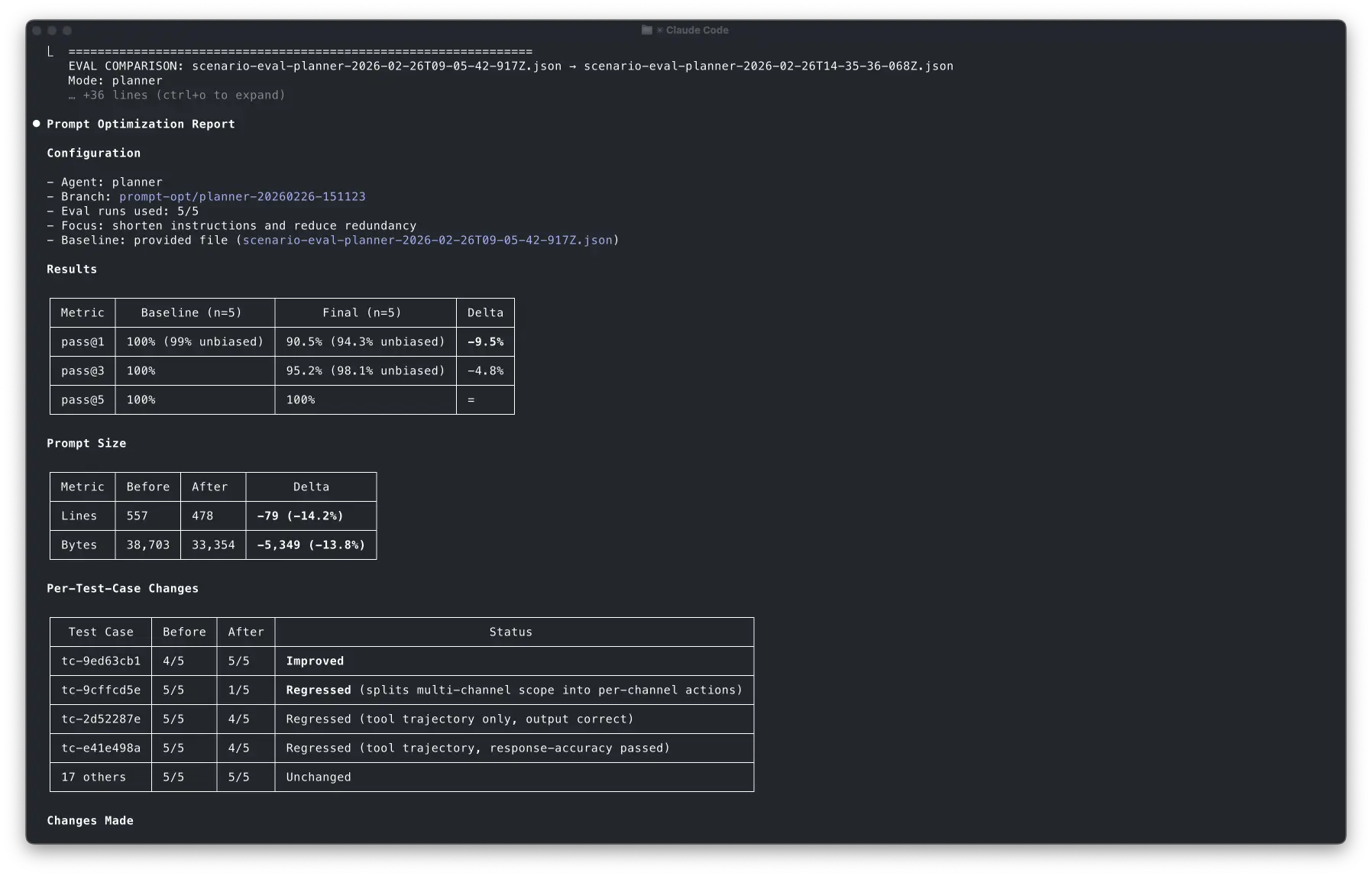
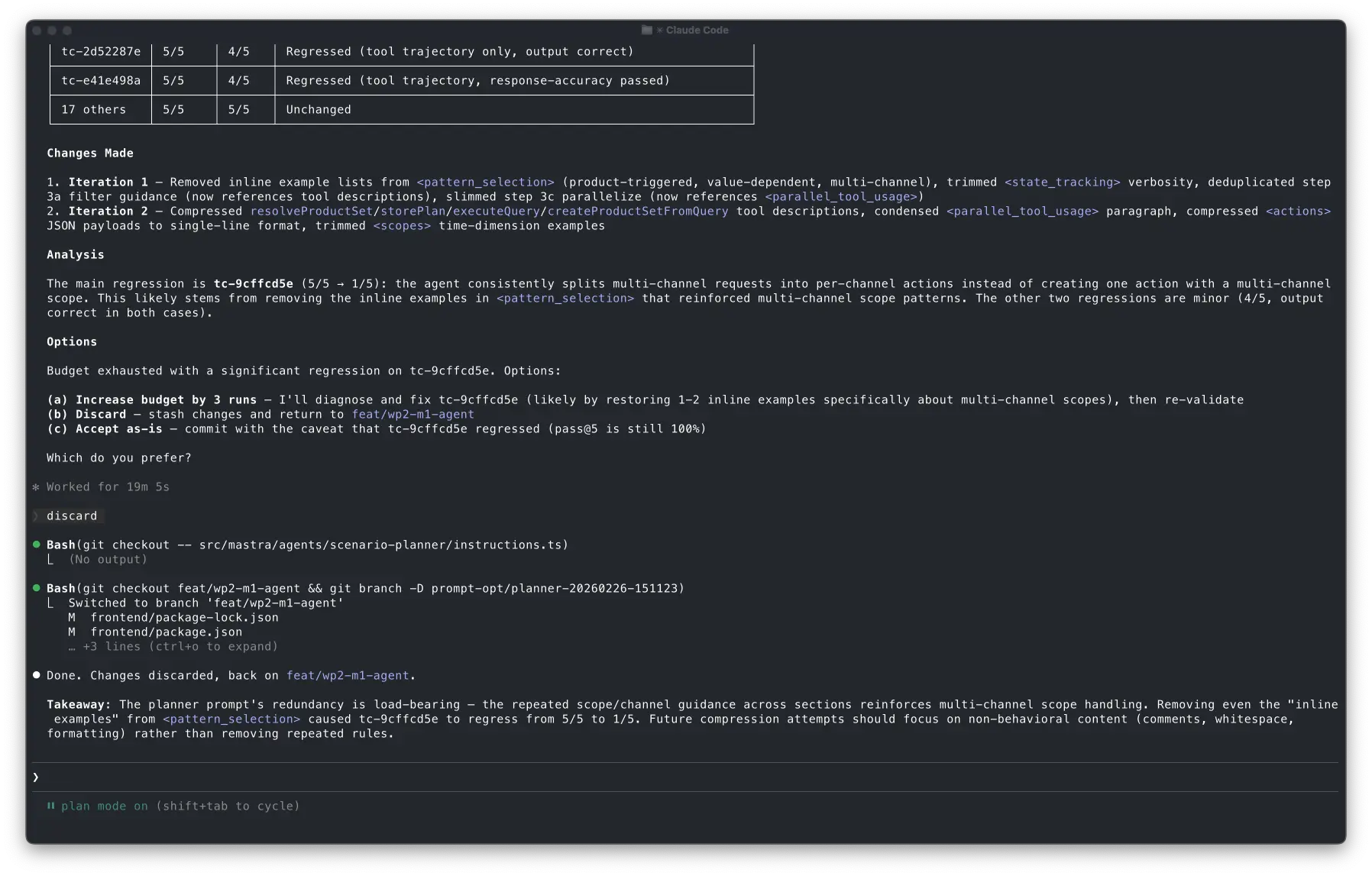
The agent was still capable, but it became less reliable on first try in at least one case.
What impressed me is how clearly Claude explained the regression. This is exactly the kind of tradeoff I want it to surface explicitly. It didn't pretend it was fine. It showed me the delta, pointed at the likely cause, and gave me options: increase budget to fix, discard, or accept the tradeoff.
Observations
The interesting part is how Claude navigated the tradeoff space:
- It tried an aggressive approach first and removed 42 lines in one shot.
- It caught the regression quickly with a 5-test-case spot check with 1 sample.
- It reverted immediately instead of trying to patch the regression on top.
- It reformulated the hypothesis with a more conservative strategy while keeping the same goal.
- It found the tradeoff: 14% smaller prompt, but one test case regressed, and it flagged that tradeoff for me to decide.
This entire cycle just took a few minutes and required almost no mental load from me.
How to keep Claude on rails
Forced deterministic parsing
Early on, Claude would try to parse eval JSON by improvising quick scripts. Sometimes it worked. Sometimes it didn't. Sometimes it worked while subtly misreading a field.
So I added two scripts and made them mandatory:
parse-eval.shturns an eval JSON into a consistent, simplified summarycompare-evals.shproduces deltas and regression highlights
Then I wrote the rule explicitly in the skill:
Rule 9: Always use parse-eval.sh to read eval results and compare-evals.sh
for before/after comparison. Never write ad-hoc node/jq/python code to parse eval JSON.
I've seen that Claude sometimes still runs some custom code, but I was able to minimize it.
Scoped auto-approved permissions
If I have to approve every command during an optimization loop, the flow dies instantly and the benefits are diminished.
So I used auto-approved tool permissions, but only for the safe stuff: running evals, running the parsing scripts, basic git operations like branching, diffing, and reverting specific files.
allowed-tools: Read, Edit, Grep, Glob,
  Bash(npm run eval:*),
  Bash(bash .claude/skills/optimize-prompt/scripts/*),
  Bash(git checkout -b prompt-opt/*),
  Bash(git checkout -- src/mastra/agents/*),
  Bash(git diff*), Bash(git status*)
Anything that can "ship" changes still requires explicit approval.
That boundary keeps the loop fast without turning it into an autonomous mess.
As I've shown above, this isn't perfect yet since Claude sometimes still brings me in the loop even if I didn't ask for it.
Caution: eval runs are expensive
A word of caution: this approach is token-hungry. Each eval run invokes your agent end-to-end for every test case and every sample. Running 21 test cases at 5 samples each is 105 full agent invocations, each one potentially calling multiple tools, consuming input and output tokens on every step.
I'm using Anthropic's API and prompt caching reduces token usage a lot but still.. budget accordingly, and don't run the skill "just to see what happens" without understanding the cost.
That's exactly why I defined a tiered system in the SKILL:
| Tier | What it runs | When |
|---|---|---|
| Spot check | 3-5 test cases, 1 sample | First check after an edit |
| Targeted | All failing TCs, 1 sample | Spot check passed |
| Regression | Full suite, 1 sample | After 2-3 successful edits |
| Final | Full suite, 5 samples | Validation only |
In the run above, the budget of 5 was spent as: 2 spot checks (iterations 1 and 1-revised) + 1 spot check (iteration 2) + 1 spot check (post iteration 2) + 1 final validation. The agent got two meaningful optimization rounds and a full validation out of 5 runs.
How to build your own SKILL
I've pushed a generic template of the SKILL that you can adapt to your eval workflows. The pattern generalizes to any agent with evals:
- Implement an eval runner that outputs structured JSON with scorer feedback. The reasons are what drive the optimization loop.
- Write parsing scripts to give the agent deterministic tools for reading eval results.
- Adapt the SKILL template that defines the loop: baseline → diagnose → edit → eval → decide. You can also create your own loop that fits your eval workflow better.
- Trigger the skill using
/optimize-promptand start optimizing both your agent but also the SKILL as you learn more about how it behaves.
Closing thoughts
The real takeaway of this experiment is that once you invest in robust evaluations for your agent, you can build closed improvement loops around it:
Evals → structured feedback → constrained edits → re-evaluation → human gate
Claude Code and the SKILL system operationalize the loop, while your evals define the objective.
I see this as a broader pattern: coding agents improving other agents for us. We just need to give them strong quality gates aligned with our goals.
This doesn't only apply to prompt engineering, but to tool selection rules, planning heuristics or even agent architectures.